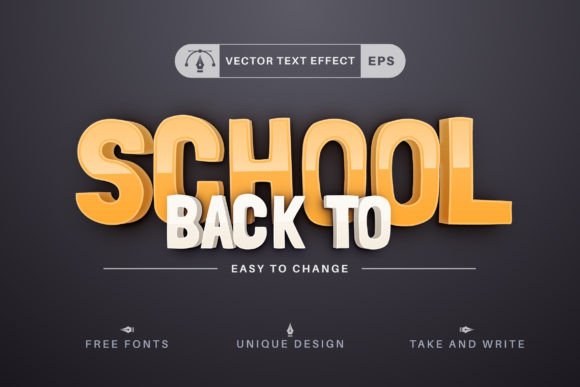
Drawing - Editable Text Effect
Imagine typing a single word—“Welcome,” “Enroll,” “Learn,” or even your school’s name—and watching it instantly transform into a vibrant, hand-drawn vector text effect that feels both playful and purposeful. That’s the core idea behind the Drawing - Editable Text Effect: a flexible, scalable vector resource designed not just to decorate, but to communicate with intention.
Why This Isn’t Just Another Text Style
Most text effects lock you into fixed shapes, rasterized edges, or rigid layer structures that break when resized or edited. The Drawing - Editable Text Effect avoids those pitfalls entirely by leveraging true vector architecture. Every stroke, shadow, and sketch-like flourish is built using editable paths and Illustrator’s Graphic Styles—meaning you’re never stuck with someone else’s design choices. You own the flexibility.
This matters most when your project evolves. A teacher preparing back-to-school posters may start with an 8.5" × 11" handout, then need the same headline blown up to 4' × 6' for a hallway banner. A freelance designer might use the same effect across social media banners, email headers, and printed welcome kits—all without reworking assets or worrying about pixelation.
Real Use Cases, Real Time Saved
Consider these everyday scenarios where the Drawing - Editable Text Effect delivers tangible value:
- Educators building classroom visuals: Swap “Back to School” for “Science Fair,” “Parent Night,” or “Library Week” in seconds—no redrawing, no font matching, no guesswork.
- Small business owners launching seasonal promotions: Turn “Summer Camp Sign-Ups” into “Fall Enrichment Classes” while preserving consistent line weight, texture, and spacing.
- Bloggers and content creators designing Pinterest pins or Instagram story headers: Apply the effect to custom phrases like “Free Download” or “New Lesson Plan” without outsourcing design work.
- Marketing teams iterating on campaign assets: Test variations of messaging (“Join Us,” “Register Today,” “Reserve Your Spot”) while keeping visual identity intact across platforms.
Each change takes under a minute—not because the file is simplified, but because it’s intelligently structured. The included Graphic Styles .ai file lets you apply or modify the drawing aesthetic with one click. No need to rebuild from scratch every time your message shifts.
Scalability Without Compromise
Vector format isn’t just a buzzword here—it’s functional necessity. The ZIP archive includes both .AI (Adobe Illustrator CC2014+) and .EPS versions. Both retain full editability: anchor points remain adjustable, strokes stay crisp at any scale, and color swatches are easily swapped via the Swatches panel.
This means you can output clean, production-ready files for screen, print, vinyl cutting, or large-format signage—without generating new assets or relying on AI upscaling tools that often blur detail or distort proportions. If you’re printing on fabric banners or engraving onto acrylic signage, fidelity isn’t optional. It’s foundational.
Who Benefits Most—and Why
The Drawing - Editable Text Effect serves people who value precision *and* personality. It’s especially helpful for:
- Non-designers with creative goals: Teachers, homeschoolers, PTA volunteers, or small nonprofit staff who need polished visuals but lack time—or training—to master complex illustration workflows.
- Design professionals managing tight deadlines: Freelancers juggling multiple clients, agency designers supporting rapid A/B testing, or in-house marketers refreshing campaigns weekly.
- Entrepreneurs launching education-adjacent products: Online course creators, tutoring services, or learning app developers seeking cohesive, approachable branding that stands out in crowded digital spaces.
It’s less about replacing illustration skills and more about removing friction between idea and execution. You focus on what to say; the tool handles how it looks—while still leaving room for your voice.
A Note on Practical Fit
While highly adaptable, this effect works best within Adobe Illustrator’s ecosystem. Users working primarily in Affinity Designer, CorelDRAW, or Canva won’t be able to edit the native vector structure—though EPS exports can sometimes be placed as high-res graphics (with limited editing). If your workflow depends heavily on non-Illustrator tools, consider whether the included documentation and quick guides align with your comfort level.
Also worth noting: the “hand-drawn” aesthetic leans warm and inviting—not sleek or corporate. That makes it ideal for educational, community-focused, or youth-oriented projects—but possibly less suited for law firm letterheads or financial reports where formality takes priority.
Thoughtful Support, Not Just Files
The creator invites feedback—not as marketing language, but as practical collaboration. If you spot a misaligned path, inconsistent stroke behavior, or unclear documentation step, reporting it helps improve future versions for everyone. That kind of responsiveness signals real investment in usability—not just distribution.
And the included documentation isn’t filler. It walks through common adjustments—like changing stroke profiles, adjusting sketch density, or integrating custom fonts—using plain language and concrete Illustrator menu references (e.g., “Window > Graphic Styles,” not “access the style library”). For users newer to vector editing, that clarity reduces trial-and-error time significantly.
Final Thought: Tools Should Extend, Not Replace, Your Voice
The strongest design resources don’t shout louder than your message—they help your message land more clearly, consistently, and confidently. The Drawing - Editable Text Effect does exactly that: it gives educators warmth, marketers speed, and creators control—all while staying rooted in editable, scalable, professional-grade vector standards.
Whether you're welcoming students back to class, announcing a new workshop, or building a brand around lifelong learning, the ability to type once and express meaningfully—without compromise—is more than convenient. It’s empowering.