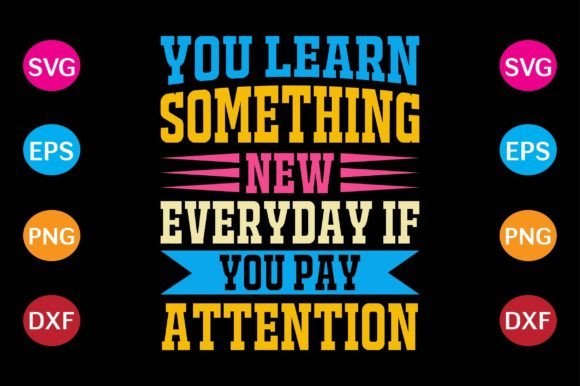
You Learn Something New Everyday
That simple, uplifting phrase—You Learn Something New Everyday—resonates deeply with adults who value growth, curiosity, and quiet confidence. It’s not just a motivational slogan; it’s a mindset embraced by educators preparing lesson plans, freelancers refining their craft, small business owners adapting to market shifts, and hobbyists experimenting with new tools. When translated into a T-shirt design, it becomes more than apparel—it’s wearable intention. But choosing the right version of this design isn’t just about picking a font or color. It’s about selecting files that actually work—reliably, cleanly, and across your real-world projects.
Why file format matters more than you think
Many people assume “digital download” means “ready to use.” Not quite. You might download a You Learn Something New Everyday design expecting crisp cuts on your Cricut—but end up with jagged edges, missing layers, or unresponsive vectors because the file wasn’t built for precision cutting. Common oversights include grabbing low-resolution PNGs meant for web display (not vinyl application), or assuming an SVG labeled “vector” is truly scalable without embedded raster elements or flattened paths.
Here’s what happens when formats don’t match your use case:
- A 72 dpi PNG looks sharp on screen but blurs or pixelates when enlarged for a tote bag or framed wall art.
- An EPS file saved from a raster-based program (like Photoshop) may appear vector-like in name only—causing errors in Silhouette Studio or failed knife cuts.
- A DXF exported without proper line weight assignment can confuse cutting machines, leading to skipped strokes or inconsistent depth on leather or wood.
These aren’t edge cases—they’re everyday frustrations for makers who assumed compatibility was guaranteed.
What’s included—and why each format earns its place
This You Learn Something New Everyday design comes with four purpose-built file types: SVG, PNG at 300 dpi, EPS, and DXF. Each serves a distinct role—not redundancy.
The SVG is optimized for web-based cutting software (Cricut Design Space, Sure Cuts A Lot) and supports layered colors, transparency, and text-as-path conversion—ideal for multi-color iron-on projects or layered cardstock designs.
The PNG at 300 dpi isn’t just “high-res”—it’s print-ready for direct-to-garment (DTG) printing, sublimation, or professional photo lab output. Unlike generic PNGs, this one includes transparent background and anti-aliased edges, so it won’t leave halos around letters on dark fabrics.
The EPS file follows Adobe Illustrator CC standards, preserving editable text, live effects, and CMYK color profiles—critical if you’re prepping for commercial screen printing or need to adjust spacing for a specific shirt size.
The DXF is clean, closed-path geometry—no fills, no gradients, no hidden layers—so CNC routers, laser engravers, and older cutting machines interpret it predictably. No guesswork. No manual cleanup.
Three overlooked checks before you cut, print, or share
Before loading any file into your machine or sending it to a printer, pause and verify these three things—especially if you’re new to digital design or outsourcing production:
- Check the bounding box and artboard size. A well-prepared file matches common garment print areas (e.g., 10" × 12" for adult tees). If your SVG opens zoomed out with invisible off-canvas elements, it may scale unpredictably—or worse, trigger auto-resizing in Cricut that distorts proportions.
- Confirm stroke vs. fill behavior. Some versions of “You Learn Something New Everyday” use outlined text (safe for all machines), while others keep text live (editable in Illustrator but risky in Silhouette). If you plan to resize significantly, outlined paths prevent font substitution or kerning collapse.
- Test one layer at a time—even for simple designs. Try importing the SVG into your cutting software and toggling visibility on individual letters or decorative elements. If parts disappear or misalign, the file likely uses unsupported grouping or clipping masks. Reputable sources avoid those.
Better choices start with realistic expectations
There’s no universal “best” file—you need the *right* file for your tool, material, and goal. A blogger making Instagram story graphics needs the PNG. A teacher crafting classroom posters benefits most from the EPS for Illustrator layout control. A craft entrepreneur running a small batch of embroidered pillows will rely on the DXF for consistent stitch placement.
Don’t default to “what’s easiest.” Ask instead: What step comes next? If your next step is heat-transfer vinyl on cotton tees, prioritize SVG with clean, single-layer outlines. If you’re submitting to a local print shop, send the EPS with Pantone references and bleed marks already included—not something you’ll need to add later.
Also, resist the urge to “just trace it.” Auto-tracing a low-res JPG of You Learn Something New Everyday introduces unnecessary nodes, uneven curves, and unpredictable scaling. It’s faster—and far more reliable—to start with native vector files designed for precision.
How this supports your broader creative workflow
Whether you're designing merch for a side hustle, creating welcome-back materials for your students, or personalizing gifts for colleagues, having properly structured files saves time, reduces waste, and raises perceived quality. A cleanly cut iron-on transfers smoothly. A 300 dpi PNG prints legibly even at 16×20 inches. An EPS scales flawlessly for both a business card and a trade show banner.
That consistency builds trust—not just with your audience, but with yourself as a creator. You stop troubleshooting file quirks and start focusing on messaging, fit, fabric choice, and how the phrase lands emotionally. Because ultimately, You Learn Something New Everyday isn’t about perfection. It’s about showing up ready—with the right tools, clear intent, and files that behave the way they should.