Violet Digital Monthly Calendar Planner
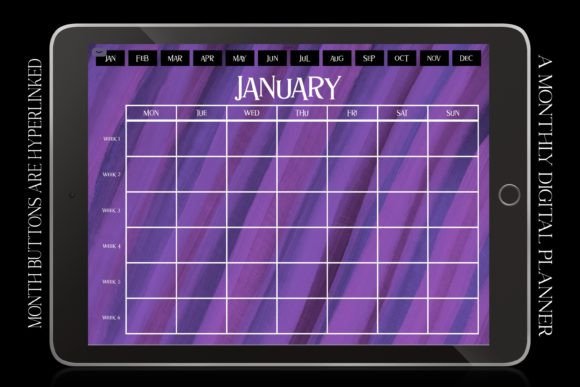
Imagine opening your iPad each morning to a soft, elegant spread—six weeks of calm clarity in one glance. The Violet Digital Monthly Calendar Planner isn’t just another digital calendar template. It’s a thoughtfully composed, undated monthly planner designed for people who value both beauty and function: minimalist yet rich in texture, retro-inspired yet fully modern, quiet in tone but powerful in utility.
Each page features a horizontal landscape layout with Monday as the first day—a subtle but meaningful choice for professionals, students, and planners who align their week with standard work rhythms. The background evokes a watercolour dream: layered washes of violet, dusky pink, deep night purple, and soft charcoal—reminiscent of vintage acrylic paint palettes. Over this, crisp white typography ensures readability without sacrificing atmosphere. It’s not flashy. It’s intentional.
Why This Planner Fits Real Life—Not Just Aesthetic Feeds
Different people reach for a planner for different reasons—and that’s where the Violet Digital Monthly Calendar Planner quietly adapts. You don’t need to “get into” planning culture to benefit from it. Whether you’re sketching out your first side-hustle launch or managing three overlapping academic deadlines, its flexibility meets you where you are.
For Students & Educators
University students juggling lectures, group projects, part-time work, and self-care often drown in fragmented reminders. With six weeks visible at once, they can spot scheduling conflicts before they happen—like realizing mid-October that three major assignments land on the same Tuesday. Teachers use it to map lesson themes across a month, note parent-teacher conferences, track student progress check-ins, or plan seasonal classroom routines (e.g., weekly gratitude journaling or reading challenges). Homeschool families appreciate how easily it accommodates rotating subjects, field trips, and co-op schedules—all without needing to toggle between apps.
For Creators & Freelancers
Bloggers, podcasters, and indie designers know creative work rarely follows a rigid 9-to-5. The Violet Digital Monthly Calendar Planner supports irregular rhythms. One user blocks colour-coded zones for writing sprints, client revisions, admin hours, and rest days—no fixed time slots required. Another uses the wide margins to jot down content ideas, podcast guest notes, or mood-based productivity reflections (“Felt energized Tues–Thurs; scheduled big edits then”). Because it’s undated, creators reuse the same layout year after year—ideal for annual series planning or long-form project tracking like NaNoWriMo prep or book manuscript milestones.
For Professionals & Small Business Owners
In fast-moving roles—marketing managers, therapists, consultants—the ability to see a full month *at a glance* reduces cognitive load. Instead of scrolling through daily views or switching tabs, they drop key dates directly onto the grid: team offsites, invoice due dates, contract renewals, quarterly review prep windows. Some layer it with GoodNotes’ shape recognition to turn handwritten meeting notes into searchable text later. Others pair it with Notability’s audio sync to record voice memos during calls, then timestamp them right beside the relevant date.
For Health-Conscious Individuals & Caregivers
This planner works beautifully beyond tasks and appointments. Its open structure invites personalization: track hydration, sleep patterns, medication timing, or weekly movement goals using simple symbols or light shading. Parents log pediatrician visits, vaccination due dates, or school nurse notes. Those managing chronic conditions use the consistent layout to compare symptom trends across months—especially helpful when sharing observations with providers.
What Makes It Work Across Devices—and Skill Levels
You don’t need advanced tech skills to get started. Import it into GoodNotes, Noteshelf, OneNote, Xodo, or Notability in seconds—no special setup, no syncing headaches. Beginners love that it asks nothing more than “what do you want to remember this month?” while experienced users leverage layers, hyperlinks, and embedded checklists to build complex systems.
Its undated format is especially practical: no wasted pages if you start mid-month, no pressure to “catch up” after a busy stretch. And because it’s built for landscape orientation, it makes full use of tablet screen real estate—unlike portrait-only templates that force constant zooming or scrolling.
More Than a Tool—A Thoughtful Pause
In a world of relentless notifications and auto-scheduled meetings, choosing a planner is also a small act of boundary-setting. The Violet Digital Monthly Calendar Planner doesn’t shout. It doesn’t demand urgency. Its restrained elegance encourages reflection—not just recording. That’s why educators gift it to graduating seniors, entrepreneurs include it in onboarding kits, and friends send it as a low-pressure “thinking of you” present during holiday seasons.
It pairs naturally with Halloween, Christmas, or New Year themes—not through cartoonish icons or forced festivity, but through its watercolour warmth and timeless palette. Think velvet ribbons, pressed violets, candlelight glow—not glitter bombs. That subtlety makes it appropriate year-round, whether you’re planning a cozy winter reading challenge or mapping spring garden rotations.
Who Might Want to Look Elsewhere?
If your priority is automated reminders, recurring event sync, or shared calendars with real-time collaboration, this isn’t built for that—it’s a static, personal planning canvas. Likewise, if you prefer strict time-blocking or minute-by-minute scheduling, a daily or hourly planner may serve you better. But if you value intention over automation, aesthetics that support focus over distraction, and a tool that grows quieter and more useful the longer you use it—that’s where this planner shines.
It’s not about doing more. It’s about seeing more clearly—what matters, what fits, what can wait. And sometimes, that clarity starts with six weeks of violet calm, waiting patiently on your screen.